1 · Share from Photos
Take a screenshot, tap Share, pick Shotpop. No hunt through the app first.
Now on iPhone and iPad
A native iPhone and iPad app that turns a plain screenshot into something worth posting. Take a screenshot, hit Share, pick Shotpop — mesh gradient backgrounds, device-frame mockups, and one tap that redacts anything sensitive.
Your screenshots never leave your phone. There is no upload.
112
Animated mesh backgrounds
7
Device frames
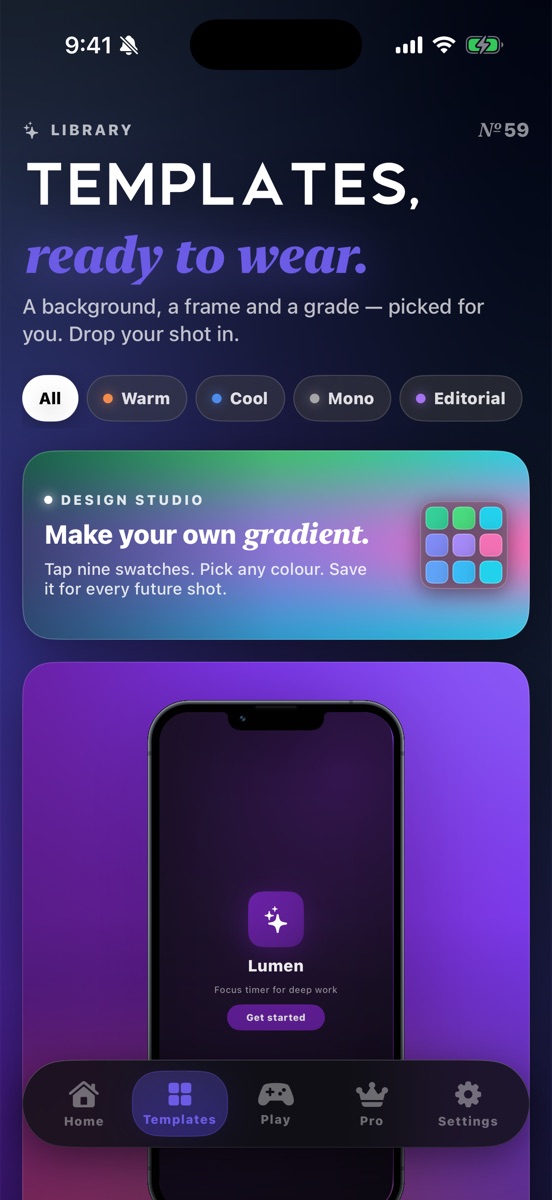
59
Templates
20
Procedural patterns
10
Photo filters
0
Images uploaded, ever
How it starts
You don't have to open Shotpop first. The screenshot preview is already in your hand — that's the fastest way in.
Take a screenshot, tap Share, pick Shotpop. No hunt through the app first.
Pick a mesh and a size. Tap Share to post, or Save to Photos. Edit in Shotpop if you want more.
Headline, CTA, your brand. Add another slide by hand. Export a card you can actually post.
Copy in the iOS preview, delete the raw shot if you want, tap any Shotpop widget. The app pastes, styles, and opens Share.
The difference
A tool that runs in a browser has to receive your screenshot before it can do anything with it. Shotpop is a native iPhone app: the editing, the text recognition and the export all happen on your device.
Being precise: the app does use third-party services for things that aren't your images — analytics and crash reporting, subscription management, ads on the free tier, and stock-photo search queries when you open that picker. All of it is itemised in the privacy policy.
Inside the app
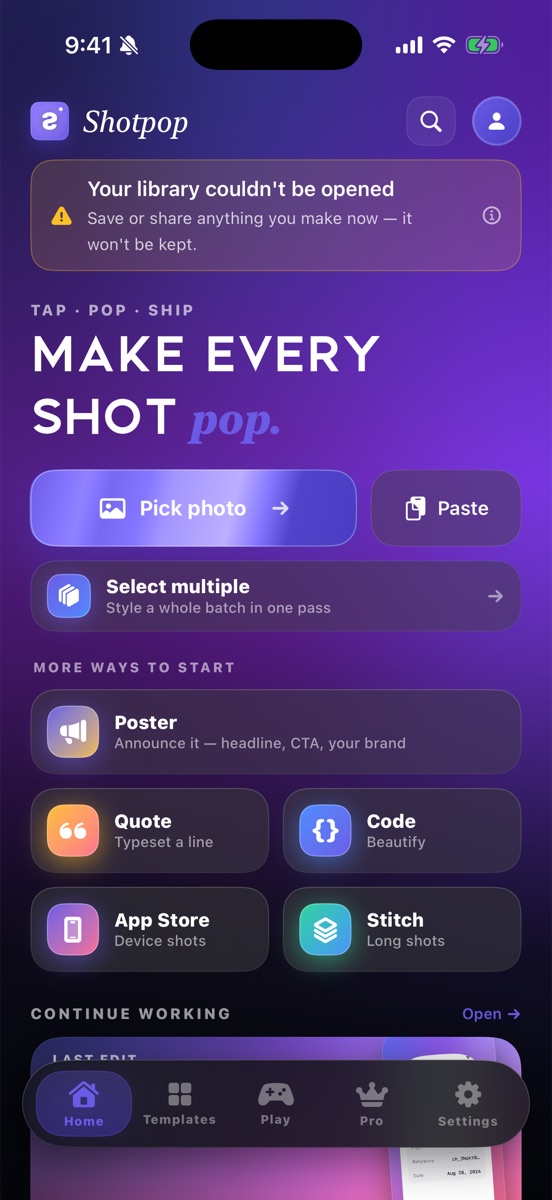
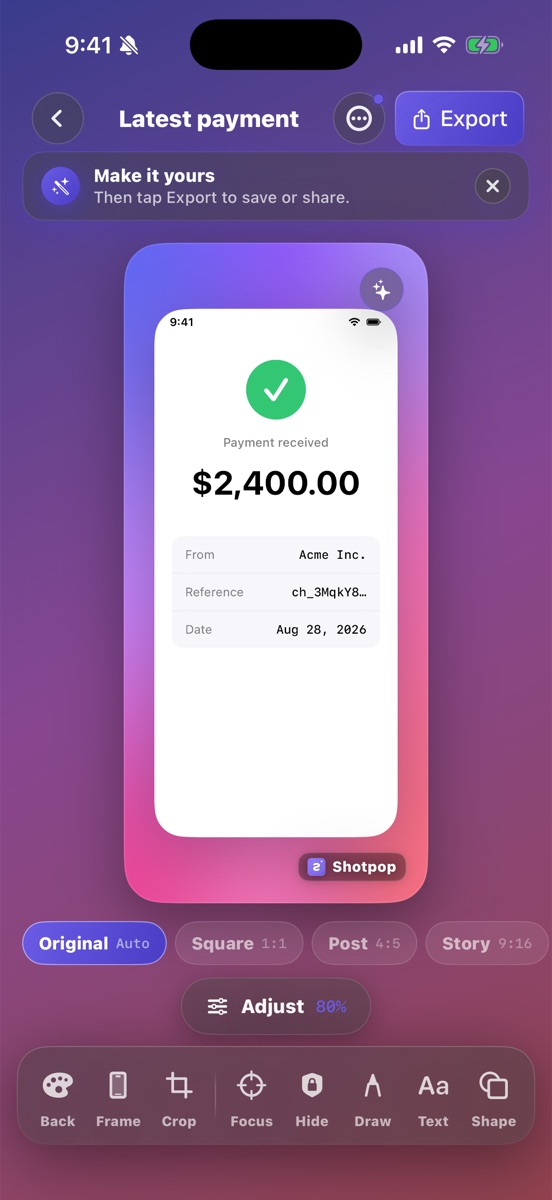
Three screens from the shipping build — the home you start on, the editor you live in, and the template library you pull from.
The backdrop
The mesh gradient isn't wallpaper — it's the identity. Every preset is a live 9-point mesh you can drop a screenshot onto, plus solid colours, twenty procedural patterns, and your own photos when you want a real backdrop.
Twelve of the full set, drawn from the app's own palette.
The frame
iPhone 17 Pro, iPhone 16, iPhone SE, Pixel 9, iPad mini, MacBook Pro and a browser window. Pick the one your screenshot actually came from — or leave it bare and let the mesh do the work.
iPhone 17 Pro
Browser window
MacBook Pro
iPhone 16 iPhone SE Pixel 9 iPad mini 59 templates · 6 collections
On the shot
Auto-redaction reads the screenshot with Apple's on-device text recognition and covers what shouldn't be public — email addresses, card numbers, API keys — before you post it. The recognition happens on your phone; the screenshot is never sent anywhere to be scanned.
Illustration of auto-redaction: recognised emails, card numbers and keys covered in place.
Text, shapes, arrows, freehand draw, numbered badges, emoji and badge stickers, and QR codes — all on a layer stack you can reorder, hide and undo.
Text Shapes Arrows Freehand Numbered badges Stickers QR codes 10 filters
A screenshot is a document. It deserves a layout.
Quote cards · six typographic treatments
The Quote card composer, with optional author and date.
The output
Shotpop isn't one editor with one export button. It's a set of composers, each shaped around a job you already do by hand.
Headline, subhead, CTA and your brand — on Editorial, Paper or a mesh. Add another slide by hand when you want a set. Open in the editor, pick the ground, Export.
We just shipped 2.0
Poster · headline, CTA, your brand
The Poster composer. One card, or a handful of slides.
Pick your screenshot, pick a device preset, and the composer renders at the precise pixel dimensions App Store Connect expects — so the upload doesn't bounce back.
Three of the seven presets. The composer covers iPhone 6.9″, 6.7″, 6.5″ and 5.5″, and iPad 13″, 12.9″ and 11″.
Paste code instead of a screenshot and Shotpop composes it as a snippet card, highlighted and framed, on the same mesh backgrounds as everything else.
// on-device, always
let request = VNRecognizeTextRequest()
request.recognitionLevel = .accurate
try handler.perform([request])
let hits = request.results ?? []
redact(hits, matching: .sensitive)Carousel export slices one wide composition into evenly cut slides for a multi-image post. Scroll Stitch joins a run of long-page captures back into a single continuous image first.
One composition, sliced into four slides.
Already in Photos? Share a screenshot and pick Shotpop. Style it in the sheet, then Share it out — or save, or open the editor.
Tap a widget to open Shotpop; the app pastes a copied screenshot and styles it. Home Screen, Lock Screen, Control Center, plus App Shortcuts.
A small mesh-matching game hides in the app. It exists purely because gradients are fun to chase.
Pricing
Free to use forever. Pro is a subscription if you want one, and a one-time purchase if you don't.
Free
$0
The whole editor, with a couple of strings attached.
Shotpop Pro Lifetime available
Prices in USD. Purchases are handled by the App Store; local prices and taxes follow Apple's regional pricing.
Questions
No. Shotpop has no upload path — editing, text recognition and export all run on your iPhone. Projects are stored on the device and are included in your iPhone backup, which is Apple's infrastructure. We don't host it and we can't read it.
Yes. Backgrounds, frames, filters, annotations, auto-redaction and export are all local, so the editor works with no connection at all.
The one thing that does need the internet is restoring a purchase. Everything else keeps working on a plane.
Free exports are unlimited and carry a small Shotpop mark. Pro removes the mark — or replaces it with your own logo. Some templates and some device frames are Pro-only. Ads are off by default; they can be turned on remotely on the free tier. Pro keeps ads off.
Everything else — the editor, the meshes, the annotation tools, redaction — is available on the free tier.
Both. Pro is $4.99 per month or $24.99 per year if you prefer a subscription, and $49.99 as a one-time lifetime purchase if you don't. Subscriptions renew through your Apple Account until you cancel; the lifetime option never renews.
No. There's no sign-up, no login and no email address collected. Purchases are tied to your Apple Account, so restoring Pro on a new phone doesn't require one from us either.
Yes. Shotpop is a native iPhone and iPad app on iOS 18 or later. On iPad the editor opens as a side panel; Home, onboarding and the paywall sit in a centred column over the same mesh.
Photos access is add-only, and only so exports can be saved to your library. Importing a screenshot uses the system photo picker, which runs outside the app and needs no library access at all.
Ads are off by default. If they are turned on, you'll see Apple's App Tracking Transparency prompt. Decline and ads stay non-personalised. Pro never shows ads.
The fastest path: take a screenshot, tap Share, pick Shotpop. Style it in the share sheet and Share it out, or save to Photos. You can also pick or paste from Home, or start a Poster, Quote, Code, App Store or Stitch project.
Tap a Shotpop widget — any size — or the Paste screenshot control in Control Center, or Paste on Home. The widget opens the app; Shotpop then pastes the copied screenshot, applies Quick Style, and opens the export screen so you can Share, Save, or Copy.
You can delete the raw shot in the iOS screenshot preview. Shotpop never deletes from your library — Photos access is add-only.
Shotpop is on the App Store now, for iPhone and iPad on iOS 18 and later. Questions go to hey@shotpop.app.
Shotpop is on the App Store. iPhone and iPad, iOS 18 or later.
 Shotpop
Make every screenshot pop, in 30 seconds
Check it out on Product Hunt →
Shotpop
Make every screenshot pop, in 30 seconds
Check it out on Product Hunt →